
What's New
We're excited to announce that all of our Add-On products can now be run within the Datarock Core platform!
Add-on products include all the products from the Advanced Geotech Bundle, Standalone products, and Bespoke products.
You will no longer need to contact Datarock support with a request to run these products and the results for these products can be downloaded from the platform.
Why we created this new feature
You've told us that:
- You want to your get your results faster
- You want to run your products independently
- You wanted more visibility across all products within your subscription in order to enhance decision-making and subscription management
We listened
This new update will put the power to run all products in your hands, giving you full and independent control of which holes you run with your products. And with an updated Subscription & Usage page, you have more visibility of all products within your subscription, giving you the information you need to more easily manage your subscriptions, and track your usage and entitlements.
The following products are now able to be run within Datarock Core:
Advanced Geotech Bundle |
Standalone Products |
Bespoke Products |
| Unique Classification |
| Unique Segmentation |
Running your Products
All the products within the subscription will be in the Actions drop down list located in the top left of the project page.
Simply select the drill hole number(s) you want to run and choose the product from the drop-down list.
The status will be displayed within the 'Pill Box' icons next to the hole:
- Still running - indicated by a spinning circle
- Successfully completed - indicated by a green tick
- Failed to complete - indicated by a red exclamation mark (Please contact Datarock support or your Customer Success Manager for assistance if your product fails to complete)
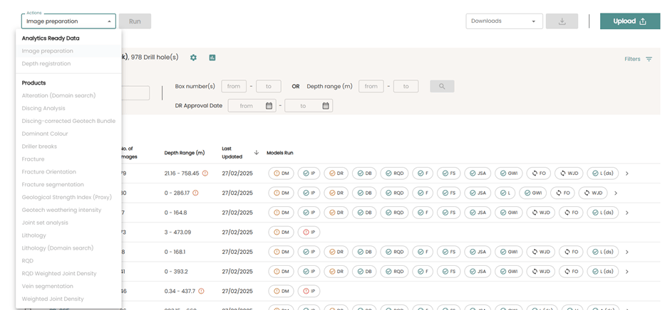
Click here for a Step-by-Step guide on how to run products on Datarock Core
Uploading CSV Files
Metadata files can be added as CSV files. Files can be uploaded using the Upload button.
Click here for a Guide on how to Upload CSV files onto Datarock Core
Downloading Results
Once the hole is successfully completed the results can be downloaded by selecting your holes and selecting the product from the Downloads dropdown menu
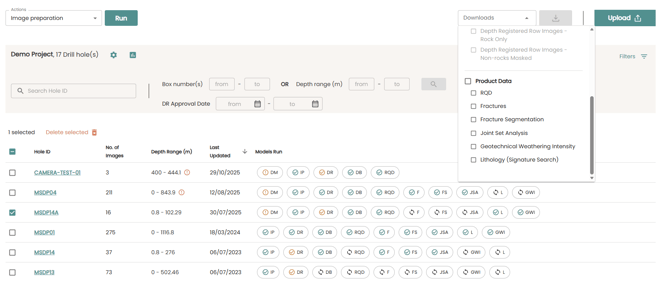
Product dependencies
In order for a product to be part of your subscription, it is necessary to acquire its dependencies as well. When you use a product on the Platform, it will automatically include and run any required dependencies. The table below also details the dependencies for each product.
|
Product |
Dependencies |
|---|---|
|
Advanced Geotech Bundle |
|
|
Weighted Joint Density |
RQD, Fractures, JSA |
| RQD Weighted Joint Density |
RQD, Fractures, JSA |
|
Joint Roughness Coefficient (Proxy) (JRC) |
RQD, Fractures, JSA |
| Geological Strength Index (Proxy) |
RQD, Fractures, JSA, WJD, GWI, JRC |
|
Standalone products |
|
|
Discing Analysis |
RQD, Fractures, JSA |
|
Fracture Orientation |
RQD, Fractures, JSA |
Click here for More information on our Product List
Checking your Usage
The Subscription & Usage page has been updated to include up to date meters used for all the add-on products within your subscription.
The Subscription & Usage page is Company-based. This means, whether you have a single project or multiple, you will have access from the same place:
- Log in to your Datarock account.
- On the Company page, where you see the list of Projects, you will see a cogwheel icon that will direct you to Company Settings.
- Click on the cogwheel and this will direct you to the Subscription Usage & Details page.
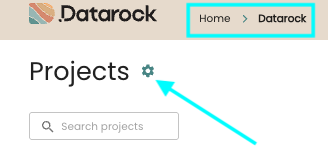
Benefits
- Self-Service: Get the information when you need it.
- Proactive Management: Early warning indicators help you manage your subscription usage better.
- Simplified Administration: Consolidated view of all subscription-related information.
Current Limitations
- Not all add-on products have in-platform visualisations yet
Click here for a full list of product visualisations in the Product List
-
- When viewing results for add-on products in the Results tab, users will see an information banner advising that results are not yet viewable in this view but are available to download via the Downloads menu.

- In-platform visualisation is a high priority for our team and we are working to bring more add-on products online soon.
- When viewing results for add-on products in the Results tab, users will see an information banner advising that results are not yet viewable in this view but are available to download via the Downloads menu.
- Usage data refreshes are based on run completion, not real-time.